Hermes now helps you improve your planets
News & Updates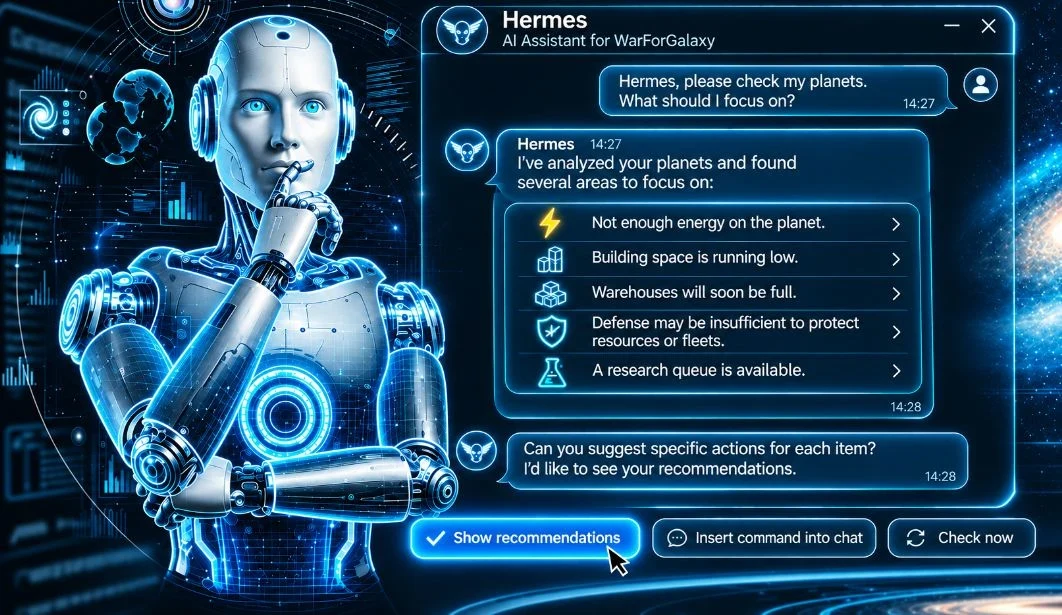
WarForGalaxy has introduced a new feature for its AI assistant, Hermes. A new “Hermes' Advice” section is now available in the in-game chat, where players can receive recommendations on how to develop their planets. Hermes checks the current state of your planets and helps you identify what needs attention first.
Author: WarForGalaxy TeamWhat can Hermes help you with?
Hermes reviews different aspects of your planets and can point out potential problems, including:
Not enough energy: Alerts you when a planet's energy supply is insufficient;
Limited building space: Warns you when available construction sectors are running out;
Storage nearing capacity: Lets you know when your warehouses are about to fill up;
Weak defenses: Identifies situations where your resources or fleets may not be adequately protected;
Idle research queue: Reminds you when a research queue becomes available.
These recommendations make it easier to spot important issues and plan your next steps.
Advice tailored to your playstyle
Not every player approaches WarForGalaxy the same way. Hermes can take your preferences into account when offering recommendations.
For example, if you prefer developing mines and avoiding PvP, you can tell Hermes:
“I don't want to attack other players. I prefer developing my mines. Remember that.”
Hermes will consider your preference when providing future advice.
You can also explore the “How Similar Players Develop” section to see typical building levels among players at a similar stage of progression.
The comparison uses aggregated statistics for groups of players, giving you a broader picture of how others develop their planets.
Background advice, even when you're offline
Hermes can now send suggestions to your in-game chat without waiting for you to ask.
Enable “Background Advice” to allow Hermes to send recommendations even when the game is closed.
If you'd like an immediate update, simply select “Check Now”.
All planet checks and advice are free.
Turn recommendations into chat commands
If you find a recommendation useful, select “Insert Command into Chat”.
The suggested command will appear in the chat input field, where you can review and edit it before sending.
This makes it easier to act on Hermes' suggestions while keeping the final decision in your hands.
Try the new Hermes advice feature
Open the in-game chat and visit “Hermes' Advice” to see what Hermes has noticed about your planets.
You can also tell Hermes about your preferred playstyle so that future recommendations better reflect your goals.
Have you tried the new feature? What problems did Hermes identify on your planets, and what other advice would you like to see?
Share your experience, discuss the update, and suggest new ideas on the official WarForGalaxy forum.
Author
Game Developers
Experience: Over 5 Years